


Latest news / Platform update
Your adventures, your privacy
Choose who can see your profile, manage shared links, and understand the limits of private sharing.
Read the storyA good adventure needs trust. Your privacy controls help you decide who can see your profile and when to stop sharing it. Here is a practical guide to those choices, without the technical detour.
You choose how your profile is shared
-
Choose your audience
Review access for matched players and shared groups.
-
Manage shared links
Choose a duration for new links and revoke old ones.
-
Pause access
Disable external profile access when you want a break.
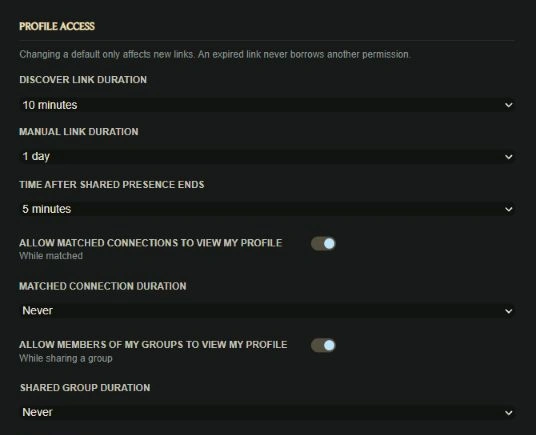
Open the Privacy section of your profile settings to review profile access. You can set durations for Discover links and manual share links, choose how long access lasts after shared presence ends, and manage access for matched connections and members of your groups.
Changing a default applies to new links. For an existing link, use the active-access controls to revoke it. You can also pause external profile access when you need a quieter moment.
A public profile is visible to anyone. That includes signed-out visitors, so blocking someone cannot make a public page invisible to them. Keep that distinction in mind when choosing what to share.
Protection without extra steps
Anemity protects stored private messages and attachment contents with encryption. You do not need to switch it on or manage it yourself.
Conversations are not end-to-end encrypted. Anemity can access protected content when needed to operate the service. Keep that limit in mind when deciding what to share.
Private sharing and public posts
-
A conversation
Share with the people in that conversation.
-
A group channel
Check who has access to that channel.
-
A public post
Treat its text and attachments as public.
Protection does not change the audience of a post or file. Public content can be seen by other people, and a public profile can be viewed by signed-out visitors too.
Check screenshots, filenames, and message text before sharing them. Leave out personal information you would not want that audience to see.
A quick check before your next session
Review your Privacy settings, remove links you no longer need, and check whether your public profile is enabled. Use a strong, unique password.
Our Privacy Policy explains how Anemity handles information. These product controls help you put your sharing choices into practice.
Make your profile as open or as quiet as you need, and review your choices whenever your plans change.
Read our Privacy PolicySee you on the next adventure,
The Anemity team